Payments & Accounts
Important Notice: Student Financial Services does not accept in-person payments (including debit) for your student financial account. Please refer to the accepted payment methods below.
You are responsible for ensuring that your payments are posted on your WebAdvisor account by the deadline. Allow sufficient processing time for your selected method of payment (more details in the links below). If you miss the term payment deadlines, a late fee will be applied to your account.
On This Page
Ways to Pay Your Student Account
Payment Methods
Payment Plan
Financial Aid and Other Funding Sources
Financial Sanction
Students with an outstanding balance on their account after the payment deadline will be placed on financial/academic sanction. A $50 fee will be charged to your account if you are placed on financial sanction. Financial/academic sanction will prevent one or more of the following:
- release of final grades
- release of transcripts
- granting of a degree or diploma
- registration changes for current and subsequent semesters
If you would like to drop a course while you are on financial sanction, please contact Enrolment Services (thelinc@uoguelph.ca) and provide the course code/name of the course(s) you would like to be dropped. Please note: depending on the date you drop the course, you may not be eligible for a refund. Students will not be allowed to add courses while on financial sanction.
For the sanction to be lifted, the student must pay the remaining balance on their account.
T2202 and T4A
Tax Information
The University of Guelph, as the issuer of T2202 and T4A forms, has a legislated obligation to ask for and report student Social Insurance Numbers (SINs) on tax slips. For this reason, students are required to submit their SIN to the University of Guelph through WebAdvisor (a secure site) no later than January 31 for the previous tax year. You only need to submit your SIN through WebAdvisor once. DO NOT send your SIN by email to anyone.
Please Note: we file a T2202 for all students that are eligible to receive one. If your SIN was not provided by January 31, the University will file your T2202 with 0’s as the SIN. This may mean that the CRA is unable to assign the slip to your My CRA Account.
To submit your SIN, log in to WebAdvisor. In the menu on the left-hand side of your screen, expand "Financial Information" and click on "SIN Entry/Status". Enter your SIN and click "Submit". If you encounter an error message while updating or entering your SIN, you will need to call our office so we can assist in resolving the error. If you no longer have access to WebAdvisor and would like to provide your SIN, you will need to bring proof of SIN and government photo ID to The Linc for processing.
For more information about the T2202 and T4A, please review the Canada Revenue Agency website.
Frequently Asked Questions – T2202 and T4A
Deposits
Registration Deposit – Undergraduate and Diploma Students Only
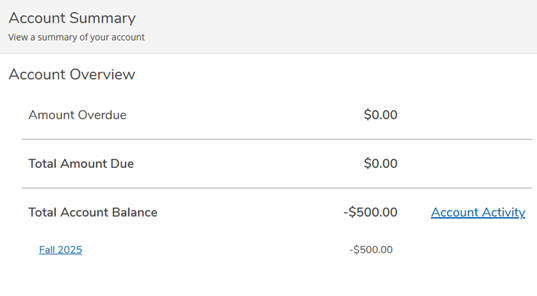
To be able to add and drop courses for the Fall and/or Winter semesters when course selection opens, all undergraduate and diploma students are required to pay a minimum, non-refundable registration deposit of $500 by the registration deposit deadline, regardless of funding sources (e.g., OSAP, bursaries or scholarships, RESPs, etc.).
Your registration deposit payment will be credited to your student account. This deposit goes directly toward your first-term tuition; it is not an extra fee, and it plays an important role in ensuring a smooth start to your academic year.
All outstanding balances from previous semesters must be paid first or the $500 will be applied to the outstanding balance and will not be considered as a registration deposit. Please review your account on WebAdvisor and consult the preferred payment methods for the registration deposit.
Failure to pay the registration deposit will result in blocked access to course selection for the registering semester. Once your deposit is received on your WebAdvisor account, you will be able to register for courses when your course selection window opens.
Frequently Asked Questions – Registration Deposit FAQs
International Deposit – NEW, First-Year Undergraduate and Diploma Students Only
To further show your commitment to attending the University of Guelph, new international undergraduate and diploma students are required to pay a non-refundable tuition deposit of $2,000 CAD by the deadline indicated on the Dates & Deadlines page. This deposit is only required for your first semester, whether that be the fall, winter or summer semester. Please consult the preferred payment methods for paying your deposit. This deposit is not an additional fee – it will be applied to your tuition balance. Please refer to your offer letter for any additional deadlines that must be met.
International Deposit – NEW Course-Based Master Students
To further show your commitment to attending the University of Guelph, new international course-based master students are required to pay a non-refundable tuition deposit of $2,000 CAD prior to being able to register. This deposit is only required for your first semester, whether that be the fall, winter or summer semester, and is not required for previous University of Guelph or Guelph-Humber students. Please consult the preferred payment methods for paying your deposit. This deposit is not an additional fee – it will be applied to your tuition balance. Further details will be communicated with students post acceptance.
Residence Deposit
Please see the Student Housing, Residence Fees and Deposits.
Statement of Financial Responsibility
By registering for classes at the University of Guelph, students agree to pay all assessed tuition and fees as a result of this registration. Students are responsible to properly cancel, adjust or drop their registration by the end of the drop and add periods, in accordance with the Academic Calendars.
Students understand that decisions with respect to any request for course withdrawals, tuition refunds, tuition adjustments, or other fees shall be made at the University of Guelph’s sole discretion and in accordance with the applicable University policies and procedures. Furthermore, students agree to pay any additional charges they may incur, including, but not limited to, charges for: residence, meal plans, class materials, other departmental charges, penalties, and late fees.
Students understand that it is their responsibility to verify their student financial account on a regular basis. Students understand that their payment(s) must be showing on their WebAdvisor Account View to be considered received. Students are responsible for ensuring payments are initiated in a timely manner to allow for bank processing times. The date on which the payment is received on WebAdvisor will be used to determine any penalties or late fees, not the date that the payment was initiated at the bank.
Students are responsible for ensuring their payment is made accurately according to the instructions provided for their selected method of payment, and to monitor WebAdvisor for receipt of the payment.
Students understand that, regardless of their eligibility for financial aid, they are personally responsible for the full amount assessed to them as a result of their registration and will be held accountable to the University of Guelph's policies and procedures. Students understand that having an overdue balance on their student financial account may have both academic and non-academic consequences (financial sanction), including, without limitation, the withholding of their degree and/or transcripts of grades.