Course Waiver Process
Many courses offered at the University have enrolment criteria that identify which students are eligible to register for the course. Criteria may include one or more of the following:
- have completed (or are expecting to complete) the course prerequisite(s), which may include a minimum number of credits and/or one or more courses;
- belong to a particular cohort of students (e.g., program, major, etc.);
- have obtained specific instructor consent; or
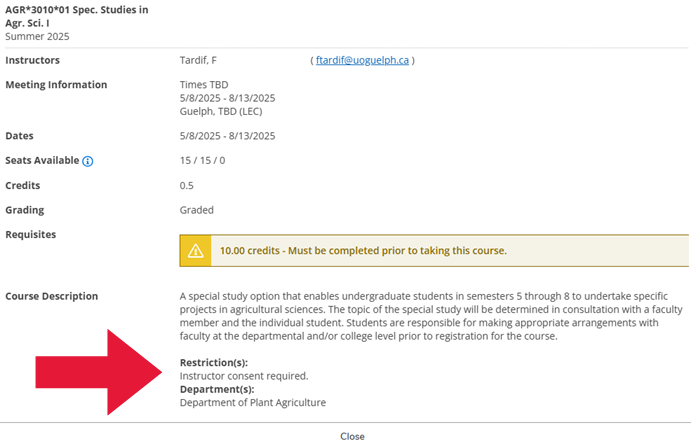
- have not completed and are not currently enrolled in an equated course. Equates are listed in the “Restrictions” field of a course description.
See the Glossary in the Academic Calendar for definitions of prerequisite, corequisite and equated courses.
Students are normally restricted from registering for courses for which they do not meet the criteria.
Additionally, students are normally restricted from registering for courses after the final add date or when doing so would result in their being registered in more than the normal semester load for a program.
However, students may seek permission to have enrolment criteria waived through the course waiver process.
Please note that the course waiver process is intended for special circumstances. Enrolment criteria, add deadlines, etc. are established with student success in mind and should only be waived in certain cases. Approval to be waived into a course is not guaranteed.
How do I know if I don’t meet the criteria for a course?
In most instances, enrolment criteria for a course are indicated within the Student Planning tool on WebAdvisor.
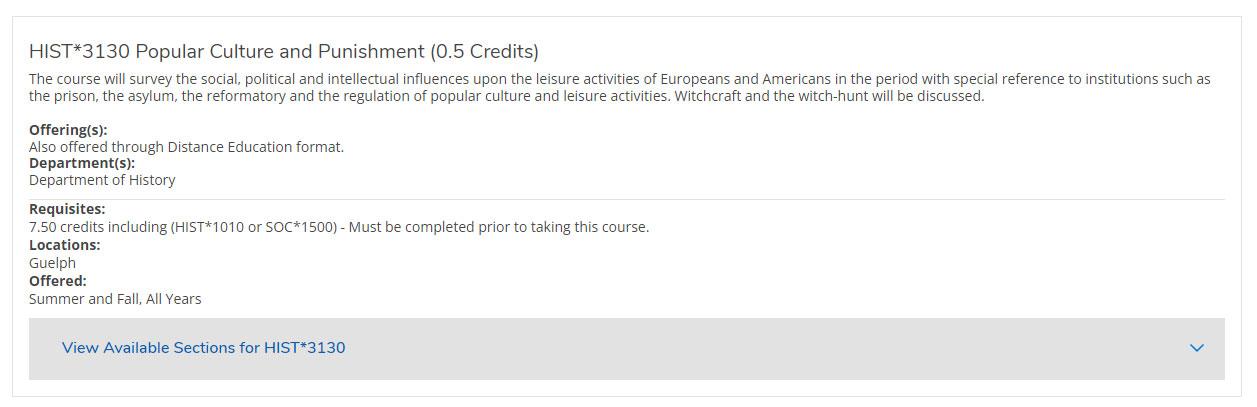
Here is a snapshot of a course description in Student Planning. As you can see under the “Requisites” section, only students who have completed at least 7.50 credits and have completed either HIST*1010 or SOC*1500 are eligible to enrol in this course.
Attempting to enrol in a course without meeting the established criteria will return error messages, letting you know that a) you failed to register for the course and b) the criteria you did not meet.
Criteria for each course are also listed in the Academic Calendar.
Restrictions based on program, specialization and/or semester level may be placed on a course to manage enrolment. Visit the Temporary and Priority Access Course Restrictions page for more details. Based on enrolment, some of these restrictions may be lifted before the end of the course selection period, while others may remain in place.
How do I complete the Course Waiver Process?
If you do not meet one or more criteria for a course, you can seek permission from the instructor or their designate to have the criteria waived. Approvals are not automatic, nor guaranteed.
Instructions for undergraduate and diploma students
Follow the steps below based on the type of restriction you’re requesting to have waived.
Instructions for graduate students
Step #1 - Download the Graduate Course Waiver Request Form available on the Forms webpage and inquire about securing the required signature(s).
- In most instances, a signature from the course instructor or their designate will be required. If the instructor is the required contact but they are listed as “TBA” for the course on WebAdvisor, consult the appropriate department's office. (The department offering the course is listed in the course description.)
- In select instances, a signature from your Graduate Program Coordinator may be required.
- There are multiple instructor signature areas on the Course Waiver Request Forms for different types of restrictions. Ensure you have the instructor or designate sign in the area(s) that corresponds to the restriction(s) you are asking to have waived! Sometimes more than one restriction will need to be waived for a course.
Step #2 – Submit the signed form to the team at the Lincoln Alexander Student Service Centre (The Linc).
- Email the completed form to thelinc@uoguelph.ca or submit it in person at The Linc after your course selection window has opened. If you are emailing it, please attach the form directly to the email – do not upload it to OneDrive.
- Exception: if you’re adding UNIV*7510/7520 in the Late Add Period, email the signed form to OGPS – Records.